TL;DR TL;DR — Quick Summary & Key Takeaways
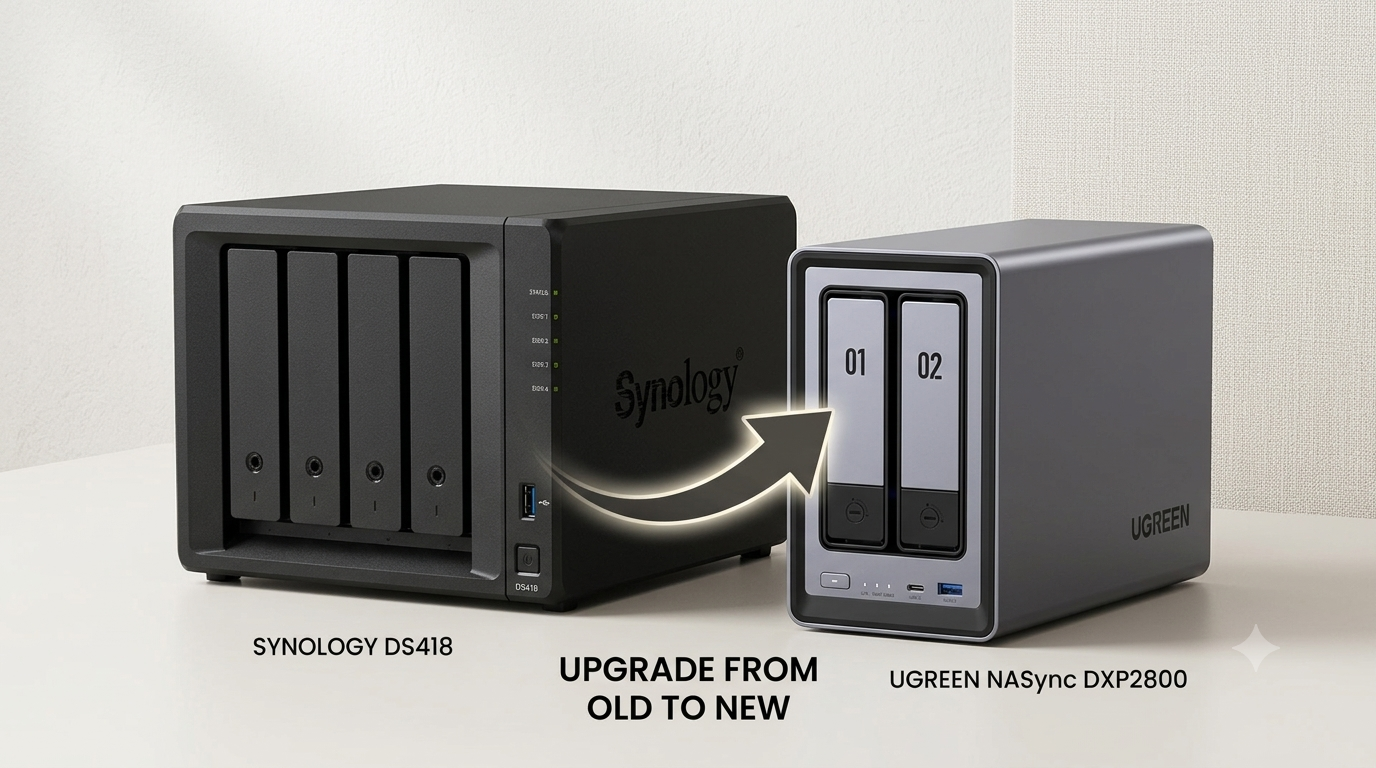
Upgrading from a Synology DS418 to a UGREEN NASync DXP2800 delivers massive hardware gains in CPU speed, RAM expandability, and networking throughput. While UGREEN’s UGOS software is still maturing, containerised workarounds bridge the gap for self-hosting enthusiasts.
- Hardware leap: Enjoy significant performance boosts with an Intel N100 processor, DDR5 RAM, and 2.5GbE networking.
- Storage versatility: Combine high-capacity SATA hard drives with high-speed NVMe M.2 SSD cache pools.
- Software maturity trade-off: UGOS lacks the polished app ecosystem of Synology’s DSM but improves rapidly.
- Docker fills the gap: Deploy missing ecosystem tools like backup daemons and media servers via Docker containers.
Finding the perfect home Network Attached Storage (NAS) setup is a balancing act between hardware capabilities and software maturity. When Prime Day offered a discount on the UGREEN NASync DXP2800, I decided it was time to retire my trusty but ageing four-bay Synology DS418. The hardware upgrade promised to be massive, but moving to UGREEN’s young operating system meant navigating several software trade-offs.
In this post, I detail my experience with the migration, comparing the hardware, evaluating the software, and sharing the workarounds I used to keep my services running smoothly.
Hardware Comparison: Superior Build and Design
The physical differences between the old Synology DS418 and the UGREEN DXP2800 are immediately apparent. While the Synology is housed in a functional but plastic shell, the UGREEN box features a premium, sturdy metal chassis. The drive carriers on the DXP2800 are also better designed, making installation and disk swapping feel much more robust. Internally, the fan design is a massive improvement. UGREEN has designed the fan to blow inwards, utilising a removable dust cover on the back for easy cleaning. This single entry point for airflow means you don’t end up with dust scattered throughout the internal electronics. The fans themselves are also significantly quieter, making the unit much easier to live with in a main living space.
From a performance standpoint, the hardware specifications are a major leap forward. Going from a four-bay unit to a two-bay unit might seem like a downgrade in capacity. However, with the two standard drive bays and two NVMe SSD slots, the UGREEN is essentially a four-bay NAS in disguise. The DXP2800 is powered by an Intel N100 processor and comes with 8 GB of DDR5 RAM on a single upgradable stick. This level of upgradability is a stark contrast to my older Synology, which was locked to its original hardware.
The UGOS Pro Software Experience
While the hardware is excellent, UGREEN’s operating system, UGOS Pro, reveals the challenges of a younger platform. The interface feels sleek and modern, with a dedicated app that provides unified access on both desktop and mobile. For users who aren’t seasoned system administrators, the management concepts are simple, logical, and easy to understand. However, experienced users migrating from Synology’s mature DiskStation Manager (DSM) will quickly notice several missing features.
Limited backup options
The native Backup & Sync application in UGOS Pro is heavily focussed on getting external data into the NAS. I found that it lacks the robust, customisable backup strategies needed to secure the data already stored on the NAS. For a device meant to serve as a secure data vault, this is a surprising limitation that requires immediate custom configuration.
Early-stage Surveillance Centre
The Surveillance Centre application is very new and still lacks many advanced features that you’ll expect. If you want motion or identification detection on your camera feeds, your cameras must natively support ONVIF, which some of my three cheap home cameras don’t. The platform also limits you to only three concurrent streams of local AI detection on this hardware. Because of these limitations, I’m considering returning to a self-hosted Frigate installation to manage my security feeds.
Lacking built-in DDNS
Unlike Synology, UGREEN doesn’t offer a dedicated, out-of-the-box Dynamic DNS (DDNS) service. You’ll need to configure your own DDNS solution if you require remote access without a VPN. While this task isn’t overly complicated, it represents another small friction point for users transitioning from DSM.
Essential Workarounds for Power Users
Fortunately, the inclusion of robust Docker support in UGOS Pro makes it easy to bypass these software shortcomings. Rather than relying on the native app package manager, you can install any containerised services you need.
Native Docker management: Better than expected
While UGREEN’s native Docker interface initially felt a bit underwhelming, I found it to be much more capable after some experimentation.
For example, it automatically notifies you when a container isn’t running the latest version of its image.
Although the user interface lacks direct support for editing environment variables, it still respects them if you place a .env file directly in the project directory.
Additionally, UGREEN has recognised that you want to access your containers remotely by providing a Quick Access feature.
Through the UGOS interface, you can select Quick Access for configured container ports, and the system sets up a secure HTTPS endpoint to that port on-the-fly.
This makes it incredibly simple to check in on local containerised services while you’re away from the house.
I had originally set up Dockge as a lightweight, file-system-first manager, but these native capabilities meant I could dismantle it and rely solely on the built-in tools.
Securing files with Backrest
Because I didn’t like UGREEN’s default backup choices, I installed Backrest inside a Docker container. Backrest acts as a web-based user interface for Restic, providing secure, encrypted, and deduplicated backups. Configuring the repository and scheduling the backups takes a bit of effort, so this could be a useful topic for a future article.
Control over Home Assistant
UGREEN offers a one-click Home Assistant application in their native app store. However, I chose to install Home Assistant via Docker instead. Running it in a container gives me complete control over backups and allows me to install custom components easily. This has been essential for my two primary integrations: tracking my energy usage via Octopus Energy and monitoring my Zappi electric car charger using the myenergi integration.
Wrapping Up
Migrating from a Synology DS418 to the UGREEN DXP2800 has been a successful upgrade, though it requires a shift in how you manage the server. The hardware quality is exceptional and is a massive step up in speed, noise reduction, and build quality. There is also a GT version of the hardware available. However, I decided it wasn’t the right fit for my needs as it moves away from Intel processors and offers DDR4 RAM to accommodate ECC memory, which I would never use. While UGOS Pro isn’t yet as mature as Synology’s DSM, the ability to run containerised workarounds makes the platform highly capable. If you enjoy Self Hosting and don’t mind configuring a few Docker containers to fill the software gaps, the UGREEN hardware is a fantastic value.