TL;DR TL;DR — Quick Summary & Key Takeaways
Google’s Agent Development Kit (ADK) introduces a hierarchical, code-first approach to building multi-agent AI applications. By adopting an “agents all the way down” philosophy and providing a visual Dev UI, it offers a modular alternative to graph-based frameworks.
- Hierarchical modularity: Structure complex workflows as trees of sub-agents rather than managing flat graph state dictionaries.
- Code-first architecture: Define agent behaviour and tools cleanly in standard Python classes extending
BaseAgent. - Integrated Dev UI: Inspect conversation histories, model prompts, and tool invocations visually using the built-in debugging interface.
- Gemini ecosystem fit: Built from the ground up to capitalise on Gemini’s massive context windows and function calling strengths.
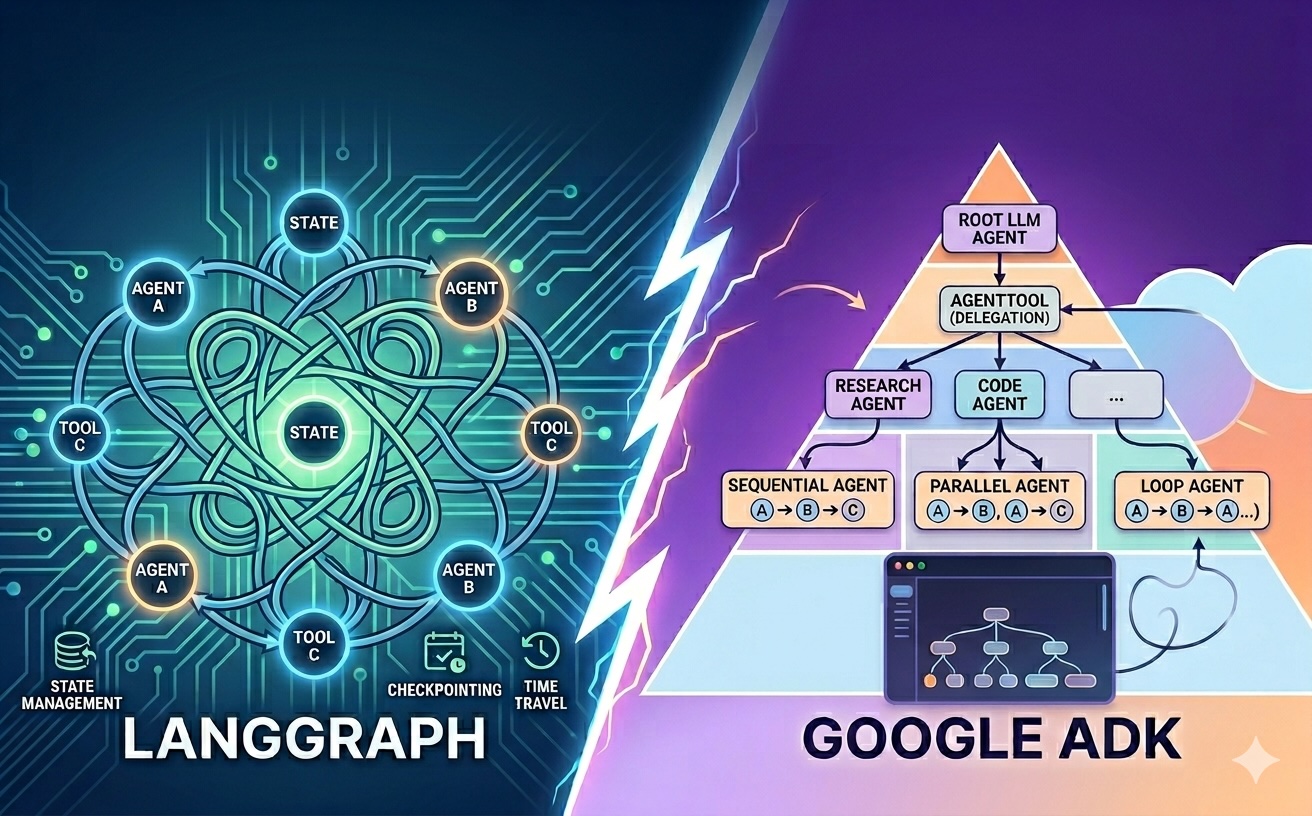
If you’ve spent any time building agentic systems lately, you’re likely familiar with LangGraph. It’s a powerful framework that treats agents as nodes in a graph, connected by edges that define the flow of execution and state. It’s robust, explicit, and extremely capable once you get the hang of it.
Google recently released the Agent Development Kit (ADK), and it brings a refreshingly different perspective. Where LangGraph feels like building a circuit board, ADK feels like building a library. It’s a code-first, modular framework that prioritises clean separation and hierarchical delegation. ADK is model-agnostic in principle, but it’s Google’s own framework and is heavily optimised for Gemini models and Vertex AI.
In this post, we’ll look at how ADK works and why it might be a compelling alternative for those already comfortable with LangGraph.
Agents as Self-Contained Modules
One of the first things you notice when working with ADK is how it encourages you to structure your code. In LangGraph, logic is often tightly coupled to the graph structure and the shared state schema. In ADK, each agent lives in its own self-contained Python module with its own definition, prompt, and tools.
This separation makes it easy to reuse agents across different projects or to swap out one specialised agent for another without rewriting your orchestration logic. It feels much closer to traditional software engineering: you’re importing a functional unit rather than defining a new node in a global state machine.
Two Ways to Compose Agents
ADK gives you two distinct patterns for multi-agent systems, which is where it becomes genuinely interesting.
LLM-driven delegation
The first pattern is dynamic delegation via the AgentTool.
You can take any agent and wrap it as a tool, which means a root LlmAgent can call a research agent just as easily as it’d call a search function.
That research agent could, in turn, have its own database agent or web scraper agent as tools.
This “agents all the way down” approach leads to a very natural hierarchy. Instead of managing a massive graph of fifty nodes, you manage a few high-level agents, each of which manages its own specialised sub-agents. The LLM at the top decides at runtime which sub-agents to invoke and in what order.
Deterministic workflow agents
The second pattern is explicit, deterministic orchestration using ADK’s three built-in workflow agent types. These don’t require an LLM to make routing decisions at all:
SequentialAgentruns its sub-agents in a fixed order, one after another. This is an assembly-line pattern: stage one feeds into stage two, and so on.ParallelAgentruns its sub-agents concurrently and merges the results. Useful when multiple independent tasks can be done at the same time.LoopAgentruns its sub-agents repeatedly until a termination condition is met, making it well suited to iterative refinement workflows.
Knowing when to reach for AgentTool versus one of these workflow agents is one of the key design decisions in ADK.
If the routing logic is predictable and you can specify it upfront, a workflow agent is simpler and more efficient.
If the routing needs to adapt based on the content of the conversation, AgentTool delegation is the right fit.
The Dev UI: Debugging Made Visual
If you’ve ever tried to debug a complex LangGraph execution, you know it can involve a lot of log-diving or reliance on external tracing tools like LangSmith.
ADK simplifies this with its built-in Dev UI, launched via adk web.
The Dev UI provides a local website (served on port 4200) where you can have a direct conversation with your agents. But it’s more than just a chat interface. As the process runs, the UI shows you:
- The agent tree: A visual representation of which agent called which sub-agent.
- Live state: The current shared memory and state of the session as it evolves.
- Artefacts: Any files, data structures, or outputs generated during the run.
- Input/output tracing: Precise details of the request and response for every single sub-agent call.
Seeing the inputs and outputs of sub-agents in a hierarchical view makes it immediately obvious where a reasoning chain went wrong. You can see exactly what the root agent asked the research agent, and exactly what the research agent replied, without digging through a flattened list of logs.
Note that the Dev UI is a development and debugging tool only; it isn’t designed for production deployments.
ADK vs. LangGraph: Which to Choose?
Choosing between the two often comes down to the nature of your task and your infrastructure.
- LangGraph is exceptional when you have complex, cyclic flows where state needs to be meticulously managed across many nodes. Its built-in checkpointing and time-travel capabilities (resuming, replaying, and branching graph state) are a genuine advantage for workflows that need durability. If your agent is essentially a state machine, LangGraph is your best bet.
- ADK shines when you want a hierarchical, modular system with explicit orchestration.
Its built-in
SequentialAgent,ParallelAgent, andLoopAgenttypes let you express deterministic multi-step pipelines without wiring the logic yourself. And if you’re already in the Google Cloud ecosystem, its native Gemini and Vertex AI integration and one-command Cloud deployment are a meaningful additional pull.
Wrapping Up
Google’s ADK represents a genuine shift in how we can think about agent orchestration. By encouraging modular agent code and providing both LLM-driven delegation and deterministic workflow primitives, it makes building complex multi-agent systems feel less like wiring and more like engineering.
Browse the Agentic AI tag as more posts in this series are published. Happy coding!