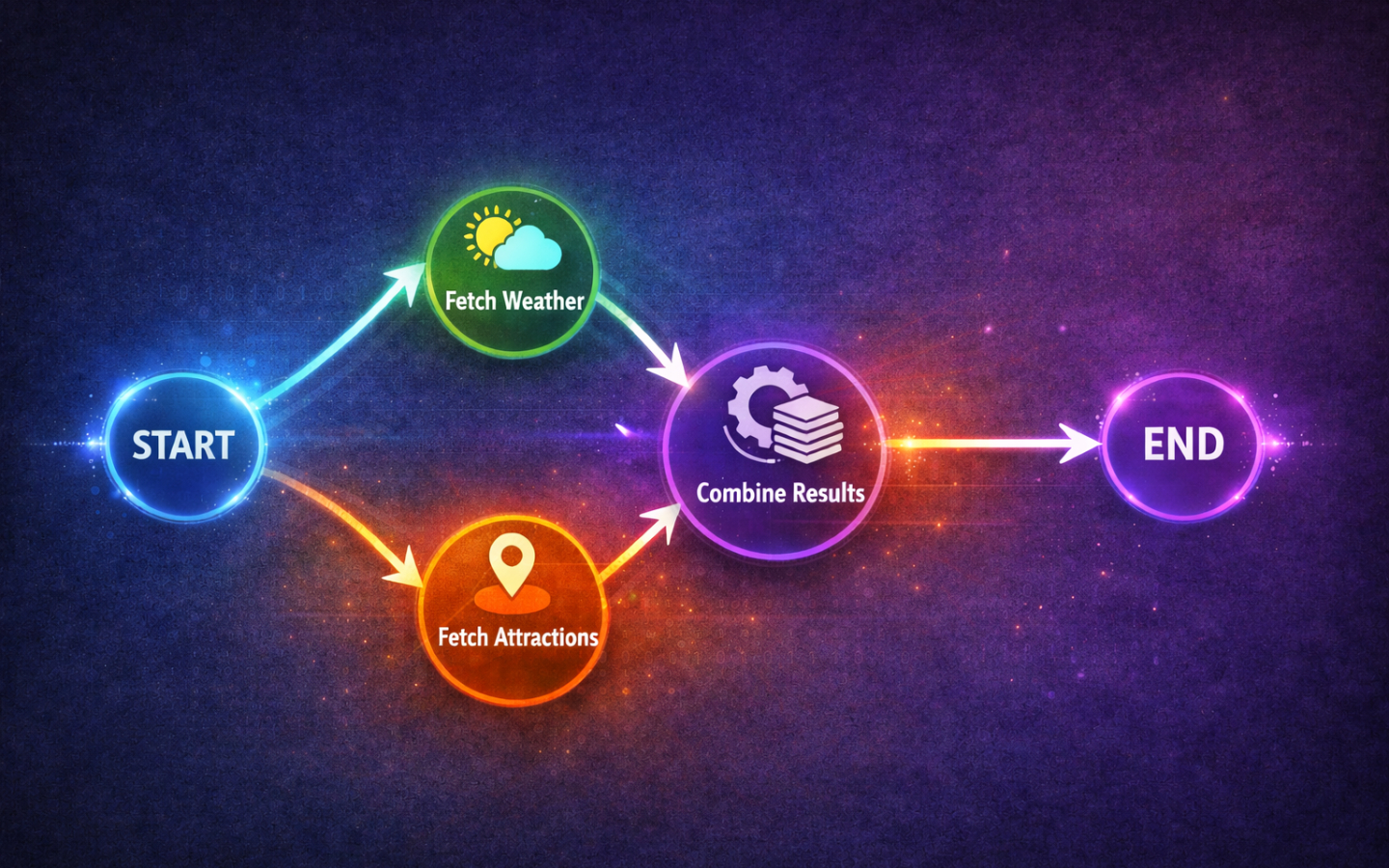
Real-world agents rarely do one thing at a time. They fetch data from multiple sources, run independent checks in parallel, and combine the results before moving on. LangGraph supports this natively with concurrent nodes, but there is a subtle catch when those nodes all write to the same piece of state. In this post we will explore how concurrency works, what goes wrong when you are not careful, and how reducers fix it.
This is part of a series of posts on LangGraph. If you are new to the series, start with A Primer in LangGraph which covers the basics, before working through the later posts.
When to Reach for Concurrency
The telltale sign is simple: if two or more nodes do not depend on each other’s output, they are candidates for concurrent execution. Both nodes only need the state as it exists before either of them runs, and neither cares what the other produces.
Imagine an agent that takes a city name and needs a weather summary and a list of tourist attractions. The weather lookup does not need the attractions, and the attractions lookup does not need the weather. Running them one after the other wastes time when they could run at the same time. Whenever you spot independent work like this in your graph, concurrency is the right tool.
What Are Concurrent Nodes?
LangGraph uses a fan-out / fan-in pattern to run nodes concurrently. Here is how it works:
- A single node (or
START) has edges to multiple downstream nodes. - LangGraph detects the fan-out and runs those downstream nodes at the same time.
- All concurrent nodes must finish before the graph continues to the next step, which is the fan-in point.
The wiring is straightforward. You add edges from the same source to each node you want to run in parallel, then add edges from each of those nodes to the join point.
from langgraph.graph import StateGraph, START, END

graph = StateGraph(...)

graph.add_node("fetch_weather", fetch_weather)
graph.add_node("fetch_attractions", fetch_attractions)

# Fan out from START to both nodes
graph.add_edge(START, "fetch_weather")
graph.add_edge(START, "fetch_attractions")

# Fan in: both nodes must finish before END
graph.add_edge("fetch_weather", END)
graph.add_edge("fetch_attractions", END)
This produces the following graph:

There is no special concurrency API. The graph structure itself tells LangGraph what can run in parallel. If a node has multiple outgoing edges to nodes that have no dependency on each other, LangGraph will schedule them concurrently.
The Problem: Overwriting State Keys
Let’s build a concrete example to see what can go wrong. We will create two concurrent nodes that each write a summary string to the same state key.
from typing import TypedDict
from langgraph.graph import StateGraph, START, END

class ResearchState(TypedDict):
    city: str
    summary: str

def fetch_weather(state: ResearchState) -> dict:
    city = state["city"]
    return {"summary": f"The weather in {city} is sunny and 22°C."}

def fetch_attractions(state: ResearchState) -> dict:
    city = state["city"]
    return {"summary": f"Top attractions in {city}: the castle, the gardens, and the old town."}

graph = StateGraph(ResearchState)

graph.add_node("fetch_weather", fetch_weather)
graph.add_node("fetch_attractions", fetch_attractions)

graph.add_edge(START, "fetch_weather")
graph.add_edge(START, "fetch_attractions")
graph.add_edge("fetch_weather", END)
graph.add_edge("fetch_attractions", END)

app = graph.compile()

result = app.invoke({"city": "Edinburgh"})
print(result["summary"])
Run this and you will see only one of the two summaries. The default behaviour for state updates in LangGraph is last-write-wins: when two nodes write to the same key, whichever finishes last overwrites the other. Because concurrent execution is non-deterministic, the “winner” can change between runs.
The dangerous part is that this is completely silent. There is no error, no warning, and no indication that data was lost. Your graph will happily return half the information without telling you.
The Solution: Reducers
A reducer tells LangGraph how to combine values when multiple nodes write to the same state key, instead of letting one overwrite the other.
You define a reducer by wrapping the type annotation with Annotated and providing a function that merges the old and new values.
The most common pattern is collecting results into a list using operator.add:
import operator
from typing import Annotated, TypedDict

class ResearchState(TypedDict):
    city: str
    summaries: Annotated[list[str], operator.add]
With this definition, when a node returns {"summaries": ["some text"]}, LangGraph does not replace the list.
Instead it calls operator.add(existing_list, new_list) to concatenate the new items onto the existing ones.
Both concurrent nodes can now write to summaries and both results will be preserved.
Let’s update our earlier example to use a reducer:
import operator
from typing import Annotated, TypedDict
from langgraph.graph import StateGraph, START, END

class ResearchState(TypedDict):
    city: str
    summaries: Annotated[list[str], operator.add]

def fetch_weather(state: ResearchState) -> dict:
    city = state["city"]
    return {"summaries": [f"The weather in {city} is sunny and 22°C."]}

def fetch_attractions(state: ResearchState) -> dict:
    city = state["city"]
    return {"summaries": [f"Top attractions in {city}: the castle, the gardens, and the old town."]}

graph = StateGraph(ResearchState)

graph.add_node("fetch_weather", fetch_weather)
graph.add_node("fetch_attractions", fetch_attractions)

graph.add_edge(START, "fetch_weather")
graph.add_edge(START, "fetch_attractions")
graph.add_edge("fetch_weather", END)
graph.add_edge("fetch_attractions", END)

app = graph.compile()

result = app.invoke({"city": "Edinburgh", "summaries": []})
print(result["summaries"])
Now both summaries appear in the output list.
The key change is small but critical: summaries is an Annotated[list[str], operator.add] instead of a plain str, and each node returns its result wrapped in a list.
You are not limited to operator.add.
You can provide any function that takes two arguments (the existing value and the new value) and returns the merged result.
For example, you could write a custom reducer that deduplicates items, merges dictionaries, or picks the longest string.
A Practical Example
Let’s bring everything together with a more realistic graph. An agent takes a city name, concurrently fetches a weather summary and a tourist attractions summary, then a final node combines them into a travel brief.
import operator
from typing import Annotated, TypedDict
from langgraph.graph import StateGraph, START, END

class TravelState(TypedDict):
    city: str
    summaries: Annotated[list[str], operator.add]
    travel_brief: str

def fetch_weather(state: TravelState) -> dict:
    city = state["city"]
    # In a real app you would call a weather API here.
    weather = f"Weather in {city}: 18°C, partly cloudy with a chance of rain in the afternoon."
    return {"summaries": [weather]}

def fetch_attractions(state: TravelState) -> dict:
    city = state["city"]
    # In a real app you would call a travel API or search engine here.
    attractions = (
        f"Top attractions in {city}: Edinburgh Castle, Arthur's Seat, "
        f"the Royal Mile, and the Scottish National Gallery."
    )
    return {"summaries": [attractions]}

def write_brief(state: TravelState) -> dict:
    combined = "\n\n".join(state["summaries"])
    brief = f"Travel brief for {state['city']}:\n\n{combined}\n\nEnjoy your trip!"
    return {"travel_brief": brief}

graph = StateGraph(TravelState)

graph.add_node("fetch_weather", fetch_weather)
graph.add_node("fetch_attractions", fetch_attractions)
graph.add_node("write_brief", write_brief)

# Fan out from START to both fetch nodes
graph.add_edge(START, "fetch_weather")
graph.add_edge(START, "fetch_attractions")

# Fan in: both feed into the write_brief node
graph.add_edge("fetch_weather", "write_brief")
graph.add_edge("fetch_attractions", "write_brief")

graph.add_edge("write_brief", END)

app = graph.compile()

result = app.invoke({"city": "Edinburgh", "summaries": []})
print(result["travel_brief"])
Here is what the graph looks like:

When you run this, the output will look something like:
Travel brief for Edinburgh:

Weather in Edinburgh: 18°C, partly cloudy with a chance of rain in the afternoon.

Top attractions in Edinburgh: Edinburgh Castle, Arthur's Seat, the Royal Mile, and the Scottish National Gallery.

Enjoy your trip!
The two fetch nodes run concurrently, the reducer collects both summaries into a list, and write_brief waits for both to finish before composing the final output.
This is the core pattern: fan out to independent nodes, use a reducer to safely collect their results, and fan in to a node that consumes the combined state.
Wrapping Up
Concurrent nodes speed up your graphs by running independent work in parallel instead of sequentially. The signal to use them is straightforward: if two nodes do not need each other’s output, they can run at the same time.
The critical thing to remember is reducers.
When concurrent nodes write to the same state key, the default last-write-wins behaviour silently drops data.
By using Annotated with a reducer function like operator.add, you tell LangGraph how to merge values instead of overwriting them.
Browse the LangGraph tag for more posts in this series. Happy coding!